
What actually changed in 8.0
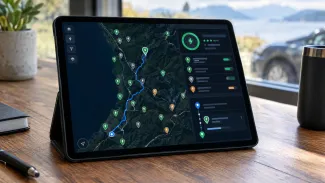
The dark mode is the feature users asked for most, according to PlugShare. It covers the whole app and switches with the iPhone, so a map that goes dark at sunset follows the phone rather than a separate in-app toggle.
The trip planner change is more practical than it sounds. Each charging stop now shows its distance from the start of the trip and from the previous stop. Until now a driver had to work that out by tapping between pins, which is exactly the moment when you are standing at a charger deciding whether to push on to the next one.
Smaller items: saved locations, trips and the profile now load when the app opens or you sign in, station photos can be opened and zoomed straight from the thumbnail, and the layout adapts to the folded positions of the iPhone Duo.
The Watch app and its filters
The rebuilt Apple Watch app lists nearby stations with distance and direction, and it inherits the plug filters from the iPhone. That detail matters. If you filtered for connectors that fit your car on the phone, the wrist list shows the same set. Tapping a station brings up its PlugScore, the network that runs it, a small map and the available plugs, listed as NACS, CCS, CHAdeMO or J1772. The list refreshes when you raise your wrist, and a station can be pinned to a watch face complication.
Why the distance readout matters
A distance between stops only helps if you know what your car will do with it. Take a mid-size EV with 77 kWh usable and a charging window of 10 to 80 percent, which is 53.9 kWh. At 20 kWh/100 km that window buys about 270 km. At 25 kWh/100 km, which is a realistic motorway figure in cold weather with heating on, it drops to roughly 216 km. The gap between those two numbers is the difference between skipping a stop comfortably and crawling in on the last few kilometres.
That is why the new readout is worth more than the dark theme. Our range calculator works the same problem from the consumption side, and the real-world range tool built on Bjørn Nyland's test data shows how far official WLTP figures sit from measured motorway results. PlugShare tells you the distance. It does not tell you what your car will use to cover it.
The number the app still leaves out
Route planning in most apps is a distance exercise. Cost is where the differences show up. Using a 20 kWh/100 km car, the same 100 km costs about €5.00 on home AC at €0.25/kWh, about €9.80 on DC at €0.49/kWh and about €15.80 on DC at €0.79/kWh. A petrol car at 7 l/100 km and €1.50/litre sits near €10.50. Add 25 percent winter consumption and the €0.49 DC case becomes €12.25 per 100 km.
Those are illustrative prices, not a market survey. The point is the ratio: the expensive DC site at €0.79/kWh costs about 1.6 times the cheap DC site at €0.49/kWh for the same kilometre, and about 3.2 times home AC at €0.25/kWh. Our cheapest superchargers page exists because that spread is large enough to plan around, and the charging cost calculator turns a route into a euro figure before you leave. PlugShare's trip planner gives you distances between stops. It does not give you a price per kWh for the stop you are about to commit to.
Connectors: a North American list
The plug labels in the Watch app are the North American set. NACS, J1772 and CCS1 belong to that market. A European car charges on Type 2 for AC and CCS2 for DC, with CHAdeMO limited to older Japanese models. PlugShare operates worldwide and its station data covers Europe, but the release notes describe the filter categories in US terms. Whether a European CCS2 car maps cleanly onto the "CCS" filter is not something the announcement answers. Drivers should check one known station against the app before relying on the wrist list at a motorway services.
Availability
The iPhone build is worldwide and rolls out through the App Store from 10 November. The Android version, with dark mode and the Material 3 redesign, is scheduled for early 2027. That leaves a large part of the European user base on the old interface through the winter, which is also the season when range estimates and stop planning get harder.
For a driver choosing between apps today, the practical split is simple. Use PlugShare for station photos, check-ins and PlugScore, since a recent photo of a poorly lit car park corner is worth more than a pin. Use a price database for the money. The two questions are separate, and version 8.0 only answered the first one.
Source: https://electrek.co/2026/11/09/plugshare-finally-adds-dark-mode-and-theres-more-for-ev-drivers/